Ready for Mac icon

One click.
Your Mac is ready.

Ready switches your whole Mac between Modes — Meeting, Focus, Work or your own — from the menu bar. Apps, sound, wallpaper and sleep change together, and Restore puts them back.

Free for 14 days · macOS 14 or later · Apple silicon only · Asks for no permissions

1Click Meeting in the menu bar

Try it

Turn on Meeting. Then put it back.

Ready writes every change into a journal before it makes it. Restore walks back through that journal — so it only touches what the mode touched. Try a simplified version right here.

Your Mac Default
31
Calendarclosed
N
Notesclosed
#
Slackopen
…
Messagesopen
Volume70%
Keep Mac awakeoff
Restore journal Empty

Changes appear here before Ready makes them.

Apps a mode opened stay open after Restore — they may hold your work. Hidden apps come back as you left them; apps a mode quit reopen in the background.

What a mode can do

Everything that changes when you switch tasks.

A Mode is a short list of actions. Start from six presets and twelve templates, or save the apps you have open right now. Changes save as you go, and each mode gets its own shortcut and a place in the menu bar.

Open, hide or quit apps

Open normally or in the background. Hidden apps aren’t quit — they come back as you left them.

Sound

Pick the speaker and microphone, set the volume, or mute the microphone for the session.

Keep Mac awake

No sleeping display during a call, a presentation or a long build.

Wallpaper

A clean desktop for screen sharing. Changes the current desktop on each display.

Project folders

Open the folders a project needs in Finder, along with its apps.

Lock screen

Lock as the last step, so stepping away is one click.

End automatically

Run a mode for 15 minutes to 3 hours. The menu shows when it ends, even after a restart.

Snapshots

Save which apps are open, hidden and in front. Restoring one never quits anything.

Turn on automatically

Modes that start themselves.

Tell a mode what to watch for. It starts when that happens and ends when it stops. This is what Apple’s Focus can’t do: open Zoom, and Meeting is already set up.

  • Reacts only to changes after Ready starts — a display that’s already plugged in won’t start a mode
  • Waits a second or two for displays and devices to settle
  • Apps a mode opens itself never start another mode
A display is plugged inWork at your desk — or when the last one is unplugged
The Mac goes on batteryTravel when you unplug, back when power returns
An app opensZoom opens → Meeting starts. Quit Zoom and it ends.
Headphones connectOr a speaker or microphone — ends when it disconnects
The mode editor

Build a mode in a minute.

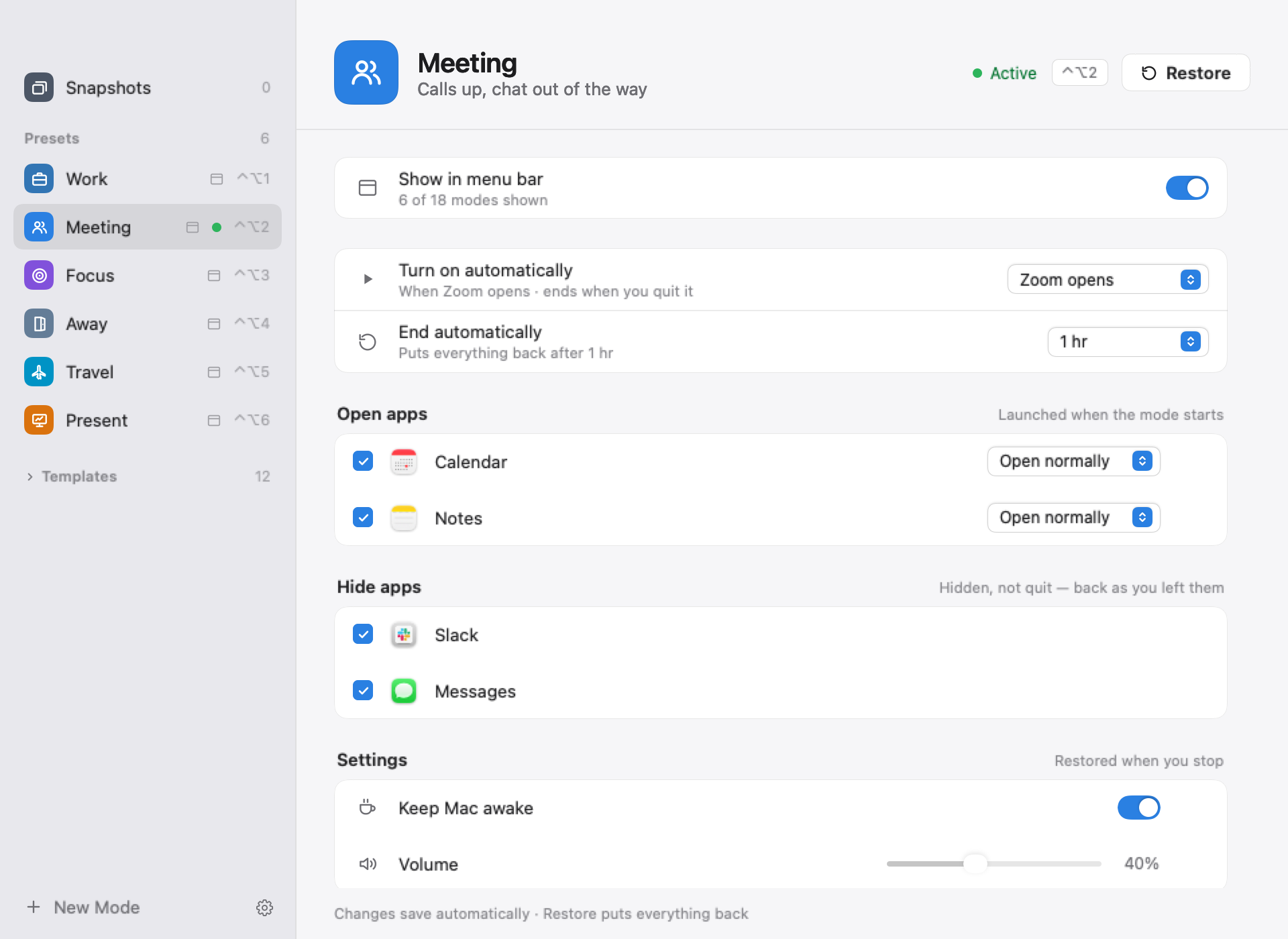
Check the apps to open and hide, choose a trigger and a time limit. Changes save as you go.

Ready
Ready's mode editor showing Meeting: turns on when Zoom opens, ends after one hour, opens Calendar and Notes, hides Slack and Messages, keeps the Mac awake and sets volume to 40%
Restore

Built so it can’t leave your Mac in a mess.

The worry with any automation is “what if it breaks my setup?” Ready is designed around undo.

Journal first

Every change is recorded before it’s made. Restore walks back through the list in reverse.

Survives a crash

The journal is saved to disk, so Restore still works after a crash or a restart.

Never closes your work

Apps a mode opened stay open. Hidden apps come back as you left them; quit apps reopen in the background.

Privacy

No permissions. Not one.

Ready uses only what macOS gives every app. It never asks to control your Mac, record your screen or read your files.

AccessibilityScreen RecordingAutomationFull Disk AccessInput MonitoringAdmin helper

Offline

No account and no analytics. Your modes and journal stay in a folder on your Mac.

No screen capture

Snapshot thumbnails are drawn from window sizes only — never from what’s on your screen.

Nothing to grant

That’s why Ready doesn’t arrange windows or switch Focus: both would need Accessibility.

Keyboard first

Switch without looking.

Pick a shortcut slot for each mode in its editor. The menu bar always shows which mode is on.

Turn a mode on or off⌃⌥1…9
Restore your previous setup⌃⌥0
Save current apps as a mode⌘S
Capture a snapshot⇧⌘S
Choose modes⌘,
Pricing

Pay once. Use it for good.

One-time purchase, no subscription; every plan includes every action, trigger and 1.x update.

Standard

For one personal Mac

$29$19
1 Mac
  • Activate on 1 Mac
  • All 1.x updates
  • Every action & trigger
Buy Standard
Most popular

Pro

Work Mac + home Mac, no key juggling

$39$29
2 Macs · best value
  • Activate on 2 Macs at once
  • All 1.x updates
  • Every action & trigger
  • Priority support & feature requests
Buy Pro

Team

For small teams who share setups

$89$69
5 Macs · ~$13.80 per seat
  • Activate on 5 Macs
  • All 1.x updates
  • Every action & trigger
  • Priority support & feature requests
Buy Team

Download the free 14-day trial — everything unlocked, no card needed.

FAQ

Questions

How is Ready different from Apple’s Focus?

Focus filters notifications. Ready changes what’s on your Mac — which apps are open or hidden, sound devices and volume, wallpaper, sleep — and puts it back afterwards. It can also start on its own when Zoom opens or a display is plugged in. Use both: Focus for notifications, Ready for the rest.

Does it really need no permissions?

Yes — no Accessibility, Screen Recording, Automation, Full Disk Access or Input Monitoring. To lock the screen, Ready uses a system login call; if a future macOS removes it, Ready sleeps the display instead, which locks when your Mac requires a password right after sleep. Wallpaper changes the current desktop on each display; other Spaces keep theirs.

What exactly does Restore put back?

Volume, sound devices, microphone mute, wallpaper and sleep return to how they were. Hidden apps come back as you left them; apps a mode quit reopen in the background (their windows and documents are up to the app). Apps a mode opened stay open, because they may hold your work.

Is Ready on the Mac App Store?

No. You download it from this site; it’s signed and notarized by Apple. Licenses are sold here, not through the App Store.

Does it run on Intel Macs?

Not yet. Ready needs a Mac with Apple silicon and macOS 14 Sonoma or later.

What happens when the 14-day trial ends?

Everything works during the trial. After 14 days, enter a license key to keep using Ready.

Which plan should I pick?

Standard covers 1 Mac, Pro 2 Macs (work + home) and Team 5 Macs. Every 1.x update is included.

How do I uninstall it? Does it leave anything behind?

Restore first if a mode is on, then quit Ready and move it to the Trash. Your modes, snapshots and journal live in ~/Library/Application Support/Ready — delete that folder for a clean removal. Ready installs no helpers or background services.

Something went wrong with my purchase.

A key that doesn’t work, a duplicate charge or anything else — contact us and we’ll make it right.